
 The Glass Cage
My first ever comment was from a robot selling herb salt. And I found it nine days late, because my website’s email never reached me.
1 · The problem
I was so excited, I can’t tell you. There it was in my WordPress dashboard: a comment! Then I saw it was in another language, which seemed unusual. If someone wants to talk to you, surely they’d use the same language as the site? I ran it through a translator: something about herb salt, with a link to a German funeral company’s website. Even then, I thought a person had written it. I’d misunderstood even that. It was a robot, hoping for a free link. A real high, then a real low.
The good news: it never appeared on the site. I’d switched on “Comment must be manually approved”, so it sat in Pending, waiting for me. The bad news: it had been waiting since 21 October, and I only found it on the 30th.
WordPress is meant to tell you. It has comment alerts built in: no code needed. Mine were switched on, and set to send to my Gmail. So the letter was written. It just never arrived.
Why it never arrived: the lazy way
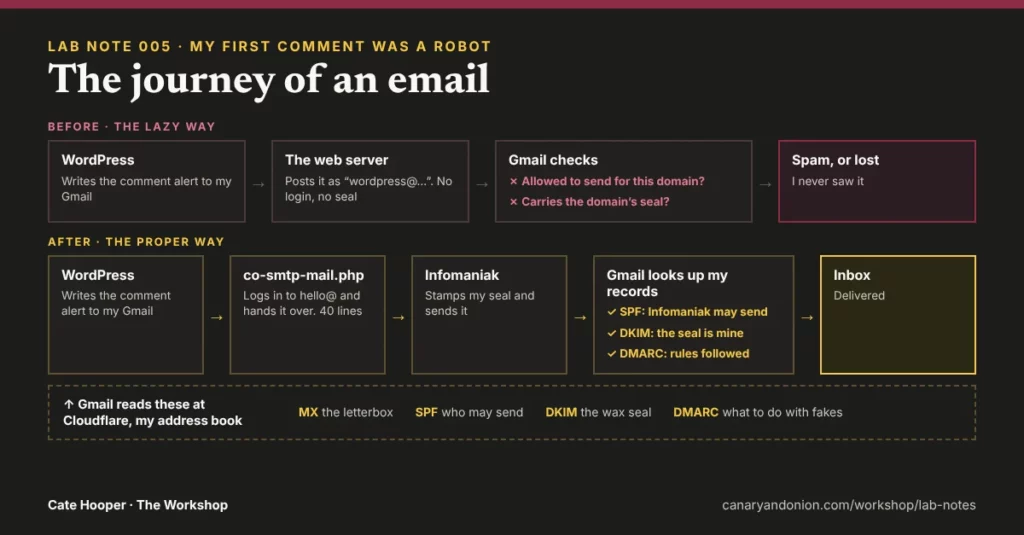
When I set up WordPress, I just assumed its emails would get through. I never thought about how. Out of the box, WordPress hands its letters to the web server, the same machine that shows my pages, with “From: [email protected]” written on them. That’s the lazy way, and anyone can write any “From” address on an email, the same way anyone can write any return address on an envelope. So Gmail doesn’t take it on trust. It checks two things:
- Is this server allowed to send for canaryandonion.com? Nothing in my domain’s records said it can. So no.
- Does the letter carry canaryandonion.com’s seal? Also, no.
Fail both, and Gmail treats the letter as a probable fake. It most likely went straight to spam, or was never delivered at all. Either way, I never saw it.
2 · What I built
Three things: a real mailbox, four public records that vouch for it, and a small file that makes WordPress use it instead of doing the lazy way.
A mailbox: [email protected]
Why not just use my Gmail? Because every email has two addresses, and they do different jobs. “To” is where it lands, and that’s still my Gmail. Nothing changed there. “From” is who’s sending, and that has to be my own domain, because only my domain’s records can vouch for it. My website can’t send as Gmail: only Google can vouch for Gmail addresses. So hello@ is the sender’s identity, a real mailbox with my host, Infomaniak, that can prove it’s me. It’s the publication’s address, kept separate from my own.
Four records, kept at Cloudflare
“But the mailbox is inside Infomaniak, so surely Gmail can see it’s genuine?” That’s what I thought. But a domain isn’t a place, it’s a name. Gmail can’t look inside Infomaniak. All it sees is “a server at Infomaniak sent a letter claiming to be canaryandonion.com”, and Infomaniak’s servers send mail for thousands of domains. So Gmail checks public notices that I, the domain owner, publish.
These are the public notices I set up:
- MX is the letterbox. It’s for mail coming to me: when someone writes to hello@, their mail service asks where canaryandonion.com’s letterbox is. Mine points to Infomaniak. Without it, nobody could email hello@ at all.
- SPF is the list of who may post letters in my name. Mine says: Infomaniak’s mail servers, and nobody else. But on its own, that would let any Infomaniak customer pretend to be me. Still not enough…
- …so DKIM is the wax seal. Only my mailbox can stamp it. The matching public half sits in my records, so Gmail can check the seal is genuine, and that the letter wasn’t changed on the way.
- DMARC is my instruction to the post office: if a letter claims to be from me but fails both checks, it isn’t mine, so throw it away. Mine is set to the strictest setting, reject. That’s safe, because my real letters pass.
Why Cloudflare, not Infomaniak? Because Cloudflare isn’t only my bouncer, it’s also my address book. When I connected my domain to Cloudflare, I told the world to look my records up there. My emails don’t pass through Cloudflare, though. It just publishes the notices.
A postman of my own: co-smtp-mail.php
A mailbox and records aren’t enough on their own: WordPress would carry on using the lazy way. My little file tells WordPress to log in to hello@ and send through it properly, just like I would from my own email app. Letters sent that way get the seal and pass the checks. The mailbox password lives in wp-config.php, never in the file itself (the same rule as Lab Note 003).
I didn’t change the comment form at all. WordPress sends every email through one door, and my file simply waits at that door and redirects every letter through hello@. Comment alerts, password resets, my contact form: all of them.
The usual fix is a plugin, like WP Mail SMTP or FluentSMTP. Mine is forty lines of my own, and the password isn’t in them.
The journey of an email, now
- Someone posts a comment. WordPress holds it in Pending.
- WordPress writes the alert, addressed to my Gmail.
- My file hands it to the hello@ mailbox at Infomaniak, instead of the web server.
- Infomaniak stamps it with my seal and sends it.
- Gmail looks up my records at Cloudflare: is Infomaniak on the list? Is the seal genuine? What do my instructions say?
- Everything passes. It lands in my inbox.
3 · What surprised me
Anyone can write my name on an envelope. I’d never thought about it, but nothing stops a stranger putting “From: [email protected]” on an email. The records are what make the fakes easy to spot.
WordPress writes more letters than I thought. Comment alerts, password resets, notices about updates. None of them reach you if your mail isn’t set up properly, and you’d never know.
4 · The receipts
The real numbers, straight through the open door
- 9 days my first comment waited unseen (21 to 30 October)
- 4 records: MX, SPF, DKIM, DMARC (letterbox, guest list, seal, instructions)
- ~40 lines in co-smtp-mail.php (and 0 passwords in it)
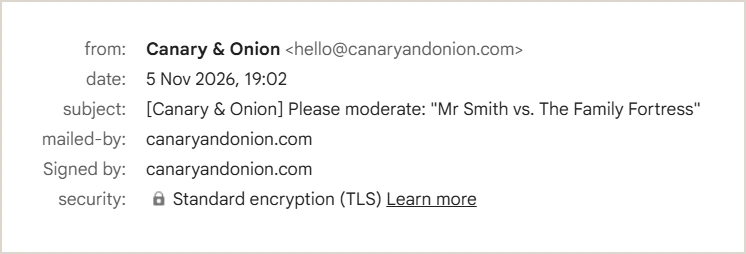
- 2 green lights: “mailed-by” and “signed by” both say canaryandonion.com on my test email (SPF and DKIM passed, so DMARC passed too)
- 0 robot comments shown on the site (moderation caught it)
5 · What I’d do differently
Test the site’s email on day one. When I set up WordPress, I just assumed its emails would arrive. They didn’t, and if a robot hadn’t come knocking, I might never have known.
6 · What this means for your site
Your website sends you emails you may never see. Here’s a two-minute test: go to your site’s login page, click “Lost your password?” and enter your email.
Did the email arrive? Is it in spam? If it never comes, ask whoever built your site to check that it sends through a real mailbox, with the right records.
The spec sheet
File
co-smtp-mail.php
Sends from
[email protected], a real mailbox with Infomaniak
Records
MX, SPF, DKIM and DMARC (reject), published at Cloudflare
Secret
The mailbox password, in wp-config.php only
Instead of
WP Mail SMTP or FluentSMTP, the usual plugins for this
Plugins added
None (just my own mu-plugin)
Built with
Infomaniak mail, Cloudflare DNS and about forty lines of PHP