
 The Glass Cage
Counting your readers sounds simple. It turned out to need two counters, three codes and one golden rule: don’t count me.
1 · The problem
I wanted to know whether anyone actually reads this site. Without a cookie, without a banner, and without Google watching over my readers’ shoulders.
And here’s the issue: I’m on this site all day long, editing, checking, fiddling. If the counter counted me, the numbers would be mostly me, and the whole point would be lost.
2 · What I built
Very little.
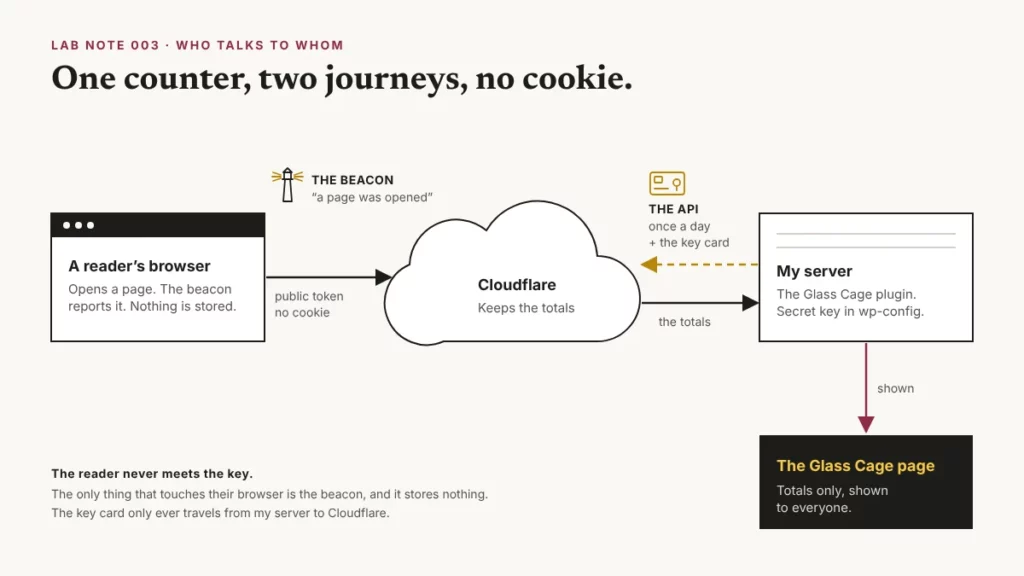
The counting itself is Cloudflare Web Analytics: a tiny script, the “beacon”, that runs in a reader’s browser and reports “a page was opened”. No cookie, and nothing stored on your device. Then two home-made pieces:
- canary-stats.php. About thirty lines. It adds the beacon to every page of Canary and Onion, except when I’m logged in working. So readers get counted. I don’t.
- A read-only key. So once a day, my Glass Cage plugin can slip through Cloudflare’s back door, fetch the totals and show them to everyone.
Why Cloudflare?
Most sites count readers with Google Analytics, and that’s what brings the cookie banner. I chose Cloudflare instead. It’s free, its counter needs no cookie, and it does three jobs at once. It counts my readers. It stands at the door and turns away a lot of the bots and login-guessers before they reach my site. And it keeps copies of my files in data centres around the world, so they reach you from somewhere close by, not all the way from my server.
There are paid cookie-free counters too, like Plausible and Fathom, but Cloudflare did the job for free, and guarded the door as well.
3 · What surprised me
There are two counters, and they don’t agree.
My site sits behind Cloudflare, so everything that asks for a page passes through it first. Cloudflare counts all of that at the door: bots, scanners, me, WordPress talking to itself. In its dashboard that count is called “visits”, under a tab called Visitors, which completely threw me. The door counter lives in my domain’s Analytics. The beacon lives somewhere else entirely, under Web Analytics in my account menu.
The beacon is the second counter. It only counts pages actually opened in a real browser: the people, not the bots knocking at the door. That makes its numbers the ones worth watching. In one day, the door counted 2,460 “page views”. The beacon counted 9. One scanner alone made around 1,290 requests. (Robots vs readers is getting its own lab note.)
I’d been counting myself. I first switched the beacon on with Cloudflare’s automatic setup, where it slips the script into every page on the way past. Easy, but it counts everyone, me included.
On 3 November I switched to my own little file instead. So some of October’s numbers were almost certainly me.
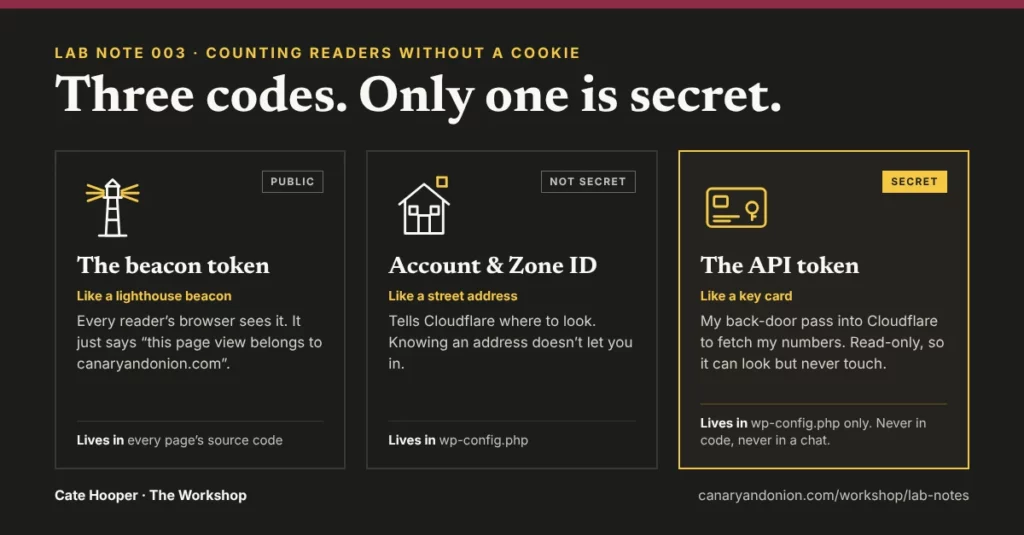
Three codes, and only one is secret.
This is the bit I found hardest, so here it is the way I finally understood it:
- The beacon token is a lighthouse. It’s public: every reader’s browser sees it in the page’s code. When someone opens a page, the beacon sends Cloudflare a tiny message: “a page was opened, here’s the country, the device, how fast it loaded.” Cloudflare counts for millions of websites, so the token is the label on the envelope: “file this under canaryandonion.com”. It can’t read anything.
- The account and zone IDs are a street address. The account ID is my house on Cloudflare’s street. The zone ID is the room inside it where canaryandonion.com’s numbers are kept. My Glass Cage plugin puts both on its request, so Cloudflare knows exactly where to look. Knowing an address doesn’t get you through the door, though. That still takes the key card.
- The API token is the key card. That’s the secret one. It’s what lets my Glass Cage plugin through Cloudflare’s back door to fetch my numbers. Without it, nobody gets in: not to read my totals, and not to touch anything. And I set mine up as read-only, so even with it, all anyone can do is look.
So what’s an API?
A door into Cloudflare that programs use instead of people. When I want my numbers, I log in with my password. My Glass Cage plugin can’t type a password, so once a day it knocks on the back door and shows its key card: “I’m allowed to read canaryandonion.com’s totals.”
And why does the key card live in wp-config.php?
Because I share my plugin files: in backups, in these notes, maybe one day in public. wp-config.php I never share. The plugin just says “fetch the key from wp-config”, so the code itself holds no secrets. And if someone tries to open wp-config.php in a browser, the server runs it and shows them nothing. The same goes for emails, chats and messages: anything you type there gets saved somewhere, so a key never goes in one.
4 · The receipts
The real numbers, straight through the open door
- 0 cookies set by the counter (Google Analytics would have set its own, and brought the banner with it)
- ~30 lines in canary-stats.php (nice and slim)
- 2,460 vs 9: one day at the door, against one day in real browsers (shocking, really)
- 1 secret, read-only, kept in wp-config.php (a safe back door: only my server holds the key)
- 8 Oct counting began · 3 Nov it stopped counting me (phew. Now the numbers are worth watching)
5 · What I’d do differently
I wish I’d gone manual from day one, so October’s numbers didn’t have me in them. I’d also misunderstood Cloudflare’s analytics: I thought my reader counter was already set up, when what I was actually looking at was the door bouncer’s view. Robots, humans and the lot. Cloudflare was new to me, and I’m really happy I learnt it and set up my own rules along the way. The dashboard is very tailorable, and it’s free. Wow. Honestly, I’d pay for it. Fathom and Plausible do charge, and they give you more detail, but for a site my size, Cloudflare’s free version does everything I need. And it’s still free of Google Analytics.
Lesson learnt: when a dashboard says “visits”, ask what it’s counting before you trust it.
6 · What this means for your site
You can count your readers without a cookie or a banner. Two things matter: make sure the counter skips you, or your numbers are mostly you, and keep any secret keys out of your code. If someone else built your site, it’s worth asking them one simple question: where do my keys live?
The spec sheet
File
canary-stats.php (and canary-glass-cage.php reads the totals)
Counter
Cloudflare Web Analytics, manual setup
Skips
Me when logged in, previews, the Customiser, and any device I’ve switched off
Public
The beacon token, in every page’s code
Secret
The API token: read-only, kept in wp-config.php
EU readers
Counted, and said so in the Privacy Covenant
Plugins added
None (just my own mu-plugin)
Built with
PHP, a read-only key, a lot of “but what does that mean?”, and Claude as my pair programmer