
 The Glass Cage
Building these Lab Notes taught me the strangest thing yet. The page that lists them doesn’t exist. Not as a page, anyway.
1 · The problem
I wanted a diary of how this site is built, mostly so I don’t forget. What I made, why, and what went wrong. That way I can clone what worked, skip the mistakes, and get faster every time. In the past I’d have written it all down and filed it away. Online, it’s right there when I need it: “Oh yep, that’s the right way to do it.”
And why not let other people see it? Maybe it helps someone. Maybe I’ll learn from theirs. I think the cookie banner is what happens when people don’t share how things are done: somewhere along the way, what it was meant for got lost, and now we’re stuck with messy copies of copies. Out in the open, there’s nothing to hide. So, hands up: this is me, learning as fast as I can, because I really want to do a great job for people.
To make it work, I set myself two rules. It mustn’t get muddled in with the publication, turning up on the homepage, in the archive or in search. And it has to keep itself up to date: I write a note, and the list just knows.
2 · What I built
One more home-made must-use plugin. That’s 14 now. I love these lean little files: each one has one job and does it. I’m not sure I’d ever go back to ordinary plugins. I feel protective of every bit of code on this site. Every line has to earn its place.
It gives WordPress a new kind of content, a Lab Note. It works like a post, but lives on its own shelf, with its own menu, its own address and its own feed. On top of that:
- A starter layout. Every new note opens with the six parts and a spec sheet, ready to fill in. It makes writing one quick, so no lesson or thought gets lost.
- A little sidebar panel. Two boxes, note number and built date, which the templates pick up and show. No hunting around for which note is which. Essential housekeeping.
- Two templates. One for the list, one for each note. Simple.
- The black Workshop bar. So you know you’ve stepped out of the publication and through the back door. Our secret passage, if you like.
- A spec sheet style. A new entry in my Styles panel, so the stats box on every note is one click, and it looks the same every time.
And that’s what this corner of the site is for. Whether you’re a builder like me, a web enthusiast or just curious, have a look around and drop me a line. Talking is learning, and a good peer group is priceless.
3 · What surprised me
The page that isn’t a page. I went looking for the Lab Notes page in my Pages list. It isn’t there. It never was.
One line in my plugin says “Lab Notes have a list, at /workshop/lab-notes/”, and that address simply exists. When you visit it, WordPress asks: do I have a template made for exactly this? It finds “Archive: Lab Note”, fills it with every published note, and hands it over.
Nothing is stored. It’s built fresh each time.
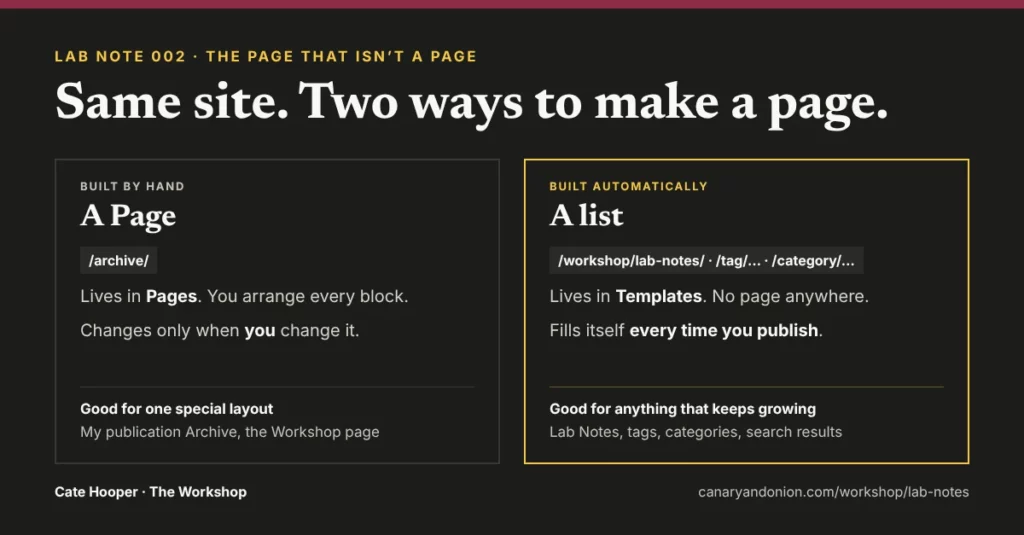
Then the penny dropped. My tag and category pages work exactly the same way. I’d been using them for months without ever seeing them in Pages. Meanwhile my publication’s Archive is a real page, arranged by hand. Same site, two ways to make a page.
The list that fills itself, and the one that doesn’t. On the Lab Notes page, the written notes come from a Query Loop: a block that asks the database “show me every published Lab Note” and lays each one out the same way. Publish a note and it appears, all on its own.
On the Lab Notes page, the written notes come from a Query Loop: a block that asks the database “show me every published Lab Note” and lays each one out the same way. Publish a note and it appears, all on its own. The “On the bench” list underneath is different. Those notes aren’t written yet, so as far as WordPress is concerned they don’t exist. There’s nothing in the database for a loop to find. So it’s a plain list I typed, my to-do list in public, and when a note goes live I delete its line.
4 · The receipts
The real numbers, straight through the open door
- 0 pages created for the Lab Notes list (it’s a template, not a page)
- 2 templates: one for the list, one for each note
- 1 new must-use plugin, and 0 ordinary plugins added
- 1 thing I update by hand: the “On the bench” list (those notes aren’t written yet, so WordPress has nothing to find)
5 · What I’d do differently
I nearly didn’t write this one. It’s the kind of thing you can use in WordPress for years without ever seeing how it works. But seeing it changed how I plan pages, and it’s the note I’ll reread most. Next time I’d ask one question before building anything: where does this page actually live?
6 · What this means for your site
Anything that keeps growing, like news, notes, products or events, should be an automatic list, so it never goes out of date. Anything you want to arrange just so, like a landing page, should be a Page. Knowing which is which saves hours of fiddling later.
The spec sheet
File
canary-lab-notes.php
The address
/workshop/lab-notes/, made by the plugin. No page behind it.
Templates
Archive: Lab Note, and Single item: Lab Note
Updates itself
The written list, the latest note, the numbers at the top
Updated by hand
The “On the bench” list
Plugins added
None
Built with
PHP, native blocks, a lot of questions, and Claude as my pair programmer